
📚 Guide
Blackboard (E-Learning)
Blackboard is the learning platform where your teachers post course materials, announcements, and assignments.
- Address
- https://elearn.nu.edu.om/
- Sign in with
- Your NU account — not your IMCO account
- NU username
- Your Student ID +
@nu.edu.om(e.g.2411234@nu.edu.om) - Password
- The same password as your IMCO account
How to sign in
- Open a browser and go to https://elearn.nu.edu.om/
- On the Blackboard login screen, open the “Sign in with third-party account” dropdown and choose MyNU Login.
- You're taken to the National University sign-in page.
- Enter your NU email address — this is your Student ID followed by
@nu.edu.om(for example2411234@nu.edu.om) — and your account password (the same one you use for campus computers), then click Sign in. - You land on the Blackboard home page with your courses listed.
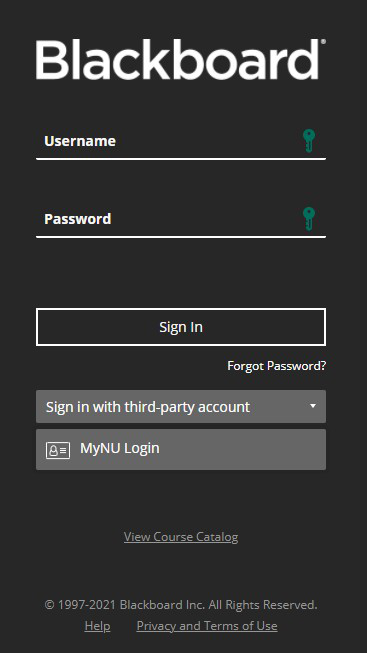
On the Blackboard login screen, use “Sign in with third-party account” → MyNU Login — don't type into the Username / Password boxes directly.
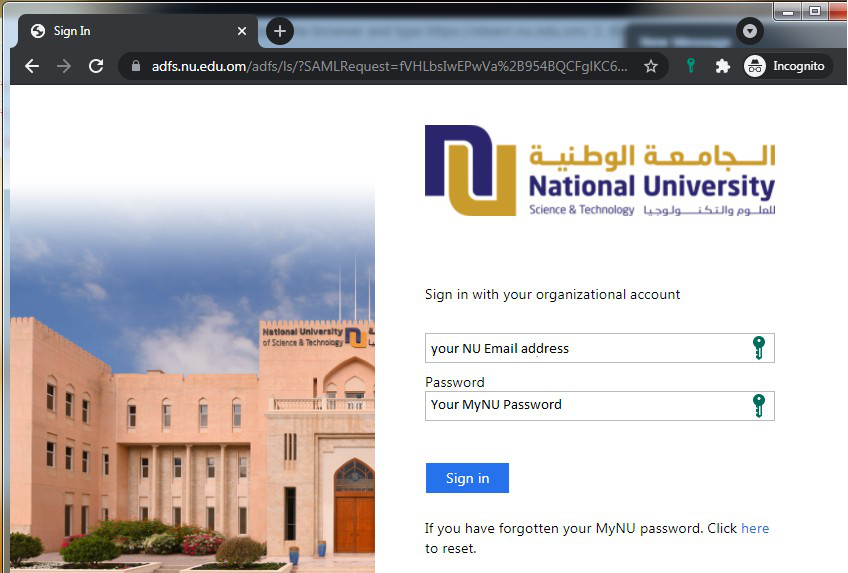
The National University sign-in page — enter your NU email address and your account password.
🚫
Forgot your password? Reset it yourself at
https://pass-reset.imco.edu.om/
— the same reset page handles NU accounts as well as IMCO ones (see
Reset a Forgotten Password). If you don't know your
NU account name, email itsupport@imco.edu.om.
💡
There's a Blackboard mobile app (“Blackboard Learn”). Sign in the same
way — search for National University and use MyNU Login.